Showing posts with label dell. Show all posts

Thursday, August 7, 2014

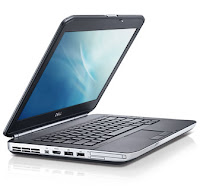
Dell Latitude E5420 Specifications

,
Dell Latitude E5420
Dell Latitude E5420 laptop is powered by Intel Core i7, i5, i3, Core 2 Duo, or Celeron processor. Dell Latitude E5420 is equipped with 14” HD or HD+ Anti-Glare LED display, Mobile Intel® HM65 Express Chipset, Dell Wireless 375 Bluetooth® 3.0, optional HD video webcam, 4-cell, 6-cell, or 9-cell battery, four USB 2.0 ports (one USB/eSATA combo), a VGA port and an HDMI port.

Dell Latitude E5420 Specifications

Display
Diagonal Size : 14.0”
Resolution : 1366 x 768 (HD)
Technology : Anti-Glare LED

Diagonal Size : 14.0”
Resolution : 1600 x 900 (HD+)
Technology : Anti-Glare LED

Graphics Card
Intel® HD Graphics 3000

Processor
Type : Intel® Core™ i7-2620M dual-core processor
Speed : 2.7 GHz with Turbo Boost up to 3.4 GHz
Cache : 4 MB

Type : Intel® Core™ i5-2540M dual-core processor
Speed : 2.6 GHz with Turbo Boost up to 3.3 GHz
Cache : 3 MB

Type : Intel® Core™ i5-2520M
Speed : 2.5 GHz with Turbo Boost up to 3.2 GHz
Cache : 3 MB

Type : Intel® Core™ i5-2410M dual-core processor
Speed : 2.30 GHz with Turbo Boost up to 2.9 GHz
Cache : 3 MB L3

Type : Intel® Core™ i3-2310M dual-core processor
Speed : 2.10 GHz
Cache : 3 MB L3

Type : Intel® Core™2 Duo Processor T6670
Speed : 2.20GHz
FSB : 800MHz
Cache : 2MB L2

Type : Intel® Celeron® 925
Speed : 2.3 GHz
FSB : 800 MHz
Cache : 1 MB L2

Chipset
Mobile Intel® HM65 Express Chipset

Memory
Up to 8GB DDR3 SDRAM at 1333Mhz - 2 DIMMS

Storage
Up to 500GB hard drive (7200rpm)
Up to 250GB hard drive (5400rpm)
Up to 128GB Solid State hard drive

Optical Drive
DVD-ROM
DVD+/-RW

Communication
LAN : 10/100/1000 Gigabit Ethernet

WLAN & WiMAX :
Intel® Centrino® Advanced-N 6205
Intel® Centrino® Advanced -N + WiMAX 6250
Intel® Centrino® Ultimate-N 6300
Dell Wireless 1501 (802.11 b/g/n 1x1)
Dell Wireless 1530 (802.11 a/g/n 2x2)

Mobile Broadband & GPS options :
Dell Wireless™ 5630 Multi-mode HSPA-EVDO Mini Card (Gobi™ 3000) with A-GPS
Dell Wireless™ 5550 Single-mode HSPA Mini Card with A-GPS

Bluetooth : Dell Wireless 375 Bluetooth® 3.0

Inputs and Controls
Single pointing or Dual Pointing Keyboard: Standard or Backlit
Multi-touch Touchpad

Audio
High Quality Speakers
Stereo headphone/Microphone combo jack
Integrated, noise reducing array microphones

Interface
1 x Network connector (RJ-45)
4 x USB 2.0 ports (1 x USB/eSATA combo)
1 x Stereo headphone/Microphone combo jack
1 x Docking Connector
1 x VGA
1 x HDMI

Slots
Card Reader :
Memory card reader, 54 mm ExpressCard, 1394
1 Full and 2 Half Mini Card Slots
Optional SmartCard Reader, PC Card

Camera
Integrated HD video webcam and Dell Webcam Central software (optional)

Power
Battery :
4-cell (40Whr) Lithium Ion battery with ExpressCharge™
6-cell (60Wh) Lithium Ion battery with ExpressCharge™
9-cell (97Wh) Lithium Ion battery

Adapter :
65 Watt or 90W AC Adapter
90W Auto/Air DC adapter (optional)

Dimensions and Weight
Width : 350 mm (13.78")
Depth : 240 mm (9.45")
Height : 29.90 - 32.5 mm (1.18 - 1.28")
Weight : starting at 2.04 kg (4.50 lbs) (with 4-cell battery and airbay)

Operating System
Genuine Windows® 7 Home Premium 32-bit
Genuine Windows® 7 Professional 64-bit
Genuine Windows® 7 Home Premium 64-bit
Genuine Windows® 7 Professional 32-bit

Dell Latitude E5420


Read more

Saturday, April 19, 2014

Dell Inspiron 1420 UMA Schematic

,

Schematic Dell Inspiron 1420 UMA

CPU: Merom CPU
North Bridge: Intel Cresline
South Bridge: ICH8-M
OEM: ASUS
PROJECT: LANAI
Format: PDF
Total Pages: 64
File size: 971Kb
Language: English

Get here
Read more

Friday, April 18, 2014

Dell Driver Install Order

,
First of all after Operating System Installation, you need to install drivers and application in correct order so that your notebook can function properly. Your drivers available on dell download site or you ask for drivers in the comment section below.

 Drivers Install Order for Dell Notebooks

1. Dell System Software System Utilities/Dell Quickset
 Provides critical updates and patches for the operating system.

2. Chipset driver
Chipset Helps Windows control system board components and controllers, such as USB ports and other internal components.

3. PCMCIA and/or Smartcard drivers  (Card Reader)
Security Enables PCMCIA and Smartcard slot capability.

4. Intel Matrix Storage Manager Serial ATA
 The Intel storage driver is only applicable to Intel chipset computers.

5. Audio driver
Audio Enables and enhances the audio controller.

6. Video driver
 Video Enhances video performance.

7. Network interface card or Ethernet drivers
 Network Enhances the network controller for internet or network access.

8. ControlPoint System Manager,
ControlPoint Security Manager, and ControlPoint Connection Manager
Note: This driver is only needed for some Latitude laptops, and depending on your system configuration, you might not need to install all three parts. Control Point The Dell ControlPoint (DCP) controls power management for some Dell Latitude laptops. ControlPoint System Manager controls power management and ambient light sensor settings, ControlPoint Security Manager controls security features, and ControlPoint Connection Manager controls wireless connection profiles.

9. Dell Quickset Application
Controls power management and ambient light sensors.

10. Wireless network drivers
Network Enables and enhances the wireless network controller.

11. Bluetooth drivers
Note: If this driver is not available, then your computer doesnt have Bluetooth capability. Continue to the next driver on the list. Network Enables and controls Bluetooth connectivity.

12. Mouse, keyboard, touchpad and input device drivers
Mouse, Keyboard and; Input Devices Enhances pointing device features.

13. Intel vPro or AMT (if available) Chipset
Enhances system manageability.

14. Dell wireless mobile broadband card drivers (if available) Network Enables wireless broadband connectivity.

15. Modem drivers (if available) Modem/Communications
Allows dial-up capability.

16. Dell Digitech touch screen driver (if available)
 Mouse, Keyboard and Input Devices Enables touch screen input on select Dell laptops.


Additional Information:

1. If you already install the drivers without following the correct order as shown above, dont worry, just make sure everything works in your laptop.

2. You can re-install all drivers again following the order given.

3. IF you notebook come with AMD processor, normally you wont need any chipset drivers. If you believe you need it, you can install latest south bridge drivers and AMD USB filter from AMD support site.

4. For external modem, you need to connect the modem first before modem driver installation. If you have internal modem, you will know by looking at the product specification.

5. Patch and Upgrade. For model with AMD and ATI graphic, it is recommended to install Netframework 2.0 and 3.5 (windows XP only) before driver installation.
Read more
 

Woodworking Plans Review Copyright © 2016 -- Powered by Blogger